Sync Inbound Email Accounts
The Sync Inbound Email Accounts tool connects to all active inbound email accounts via IMAP and corrects synchronisation issues. It is found in Admin → Repair → Sync Inbound Email Accounts.

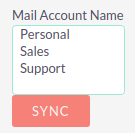
The Mail Account Name list shows all active inbound email accounts, including personal accounts. Select the accounts you want to sync (use ctrl + click to select more than one) and click SYNC.
|
Select the required accounts from the list and click SYNC. |
The page will refresh and display the progress of the tool.
What the tool does
For each selected account the tool:
-
Connects to the email server via IMAP
-
Downloads email header information
-
Determines the orphaned status of emails
-
Updates the unique ID for each email
-
Corrects synchronisation problems
Error handling
If an error occurs on one account, the tool can still be run on the remaining accounts. Details of any errors are written to suitecrm.log.