public/legacy/custom/modules/<Module>/metadata/detailviewdefs.php
public/legacy/custom/modules/<Module>/metadata/listviewdefs.php
public/legacy/custom/modules/<Module>/metadata/searchdefs.php
public/legacy/custom/modules/<Module>/metadata/subpaneldefs.php
public/legacy/custom/modules/<Module>/metadata/popupdefs.phpCustomizing View Metadata
1. Introduction
SuiteCRM 8 provides several mechanisms to customize view metadata (the configuration that drives how record views, list views, and other UI components are rendered). These range from simple legacy file overrides to powerful PHP mapper classes in extensions.
This guide provides an overview of each approach, when to use it, and where the files go. Detailed documentation for each approach is linked where available.
1.1 Metadata processing pipeline
Understanding the order in which metadata is processed helps you choose the right approach.
Field definitions and view definitions are processed in two separate pipelines that merge when the view handler assembles the final metadata:
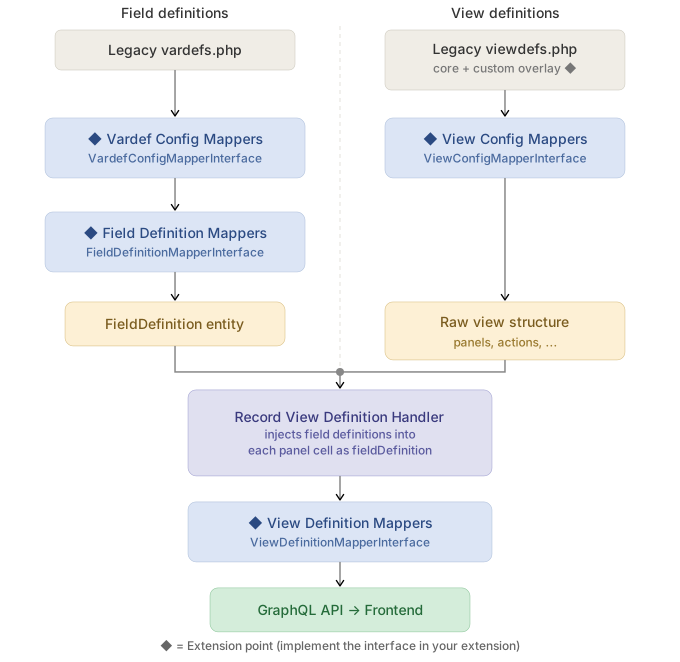
The left pipeline processes field-level metadata (vardefs). The right pipeline processes view-level structure (panels, widgets, actions). They merge in the Record View Definition Handler, which injects field definitions into each field cell within the view panels. View Definition Mappers run last and have access to both the assembled view structure and the field definitions.
Each mapper type operates at a different stage and has access to different context. Choose the approach that matches the stage where your customization makes sense.
The following sections explain each extension point in detail:
-
2. Custom legacy viewdefs — file-based overrides (simplest, no code)
-
3. Field definition pipeline — field-level mappers (vardefs)
-
3.1 Vardef Config Mappers — raw vardef transforms
-
3.2 Field Definition Mappers — field logic, validation, display conditions
-
-
4. View definition pipeline — view-level mappers (viewdefs)
-
4.1 View Config Mappers — pre-assembly view structure changes
-
4.2 View Definition Mappers — post-assembly, context-aware transforms
-
-
5. Choosing the right approach — comparison table
2. Custom legacy viewdefs
The simplest approach. Copy the core viewdefs file to the custom directory and modify it directly.
When to use
-
Quick layout changes (reorder fields, add/remove panels)
-
Adding record actions (buttons), sidebar widgets, or top widgets
-
Adding
recordLogicentries for record-level logic -
Simple one-off customizations for a specific module
Where files go
Copy the core file from public/legacy/modules/<Module>/metadata/ to:
Example
<?php

// public/legacy/custom/modules/Accounts/metadata/detailviewdefs.php

$viewdefs['Accounts'] = [
    'DetailView' => [
        'templateMeta' => [
            'maxColumns' => '2',
            'useTabs' => false,
            'tabDefs' => [],
        ],
        'panels' => [
            // ... panel definitions
        ],
        'recordLogic' => [
            // ... record logic rules
        ],
    ],
];
Drawbacks compared with extension mappers
-
Full file replacement — custom viewdefs fully replace the core file for that module/view. You must copy and maintain the entire file, not just your changes. When the core viewdefs are updated in a new SuiteCRM release, your custom file will not pick up those changes automatically.
-
Not composable — only one custom viewdefs file can exist per module/view. If two independent customizations need to modify the same viewdefs, they must be manually merged into a single file. Extension mappers, by contrast, are additive — multiple mappers can modify the same view independently.
-
Module-specific only — each custom file applies to a single module. To apply the same change across many modules, you must duplicate the file for each one. Mappers can target
'default'to apply globally. -
No programmatic logic — the custom file is a static PHP array. You cannot conditionally add panels, inject logic based on field types, or read configuration at runtime. Mappers are PHP classes with full access to the service container.
-
Not packaged in extensions — custom viewdefs live in
public/legacy/custom/, outside the extension system. They cannot be distributed as part of a self-contained extension folder. Mappers live underextensions/<ExtName>/and can be installed or removed cleanly.
3. Field definition pipeline
These mappers operate on the left column of the pipeline diagram — they transform field-level metadata (vardefs) before fields are injected into views.
3.1 Vardef Config Mappers
Modify raw vardef field definitions before they are processed by other mappers. Useful for setting default properties on fields globally.
When to use
-
Setting default field properties across all modules (or a specific module)
-
Transforming field configuration at the source level
-
Simple, early-stage field modifications
Interface
Implement App\FieldDefinitions\Service\VardefConfigMapperInterface:
interface VardefConfigMapperInterface
{
    public function getKey(): string;
    public function getModule(): string;      // 'default' for all modules
    public function map(array $vardefs): array;
}
Auto-tagged as vardef.mapper — no manual service registration needed.
Where files go
For global mappers (targeting all modules), place them under backend/ following the same structure used in core/backend/:
extensions/<ExtName>/backend/FieldDefinitions/VardefConfigMappers/MyVardefMapper.phpFor module-specific mappers, place them under the corresponding modules/ folder. We recommend mirroring the core path from there on, or grouping files by domain:
extensions/<ExtName>/modules/<Module>/Service/Fields/MyVardefMapper.phpAs long as the file is under extensions/<ExtName>/backend/ or extensions/<ExtName>/modules/, it will be auto-discovered.
More information
For a detailed example, see Adding field vardef config mapper.
3.2 Field Definition Mappers
Transform individual field definitions after vardef processing. This is where you add field logic, validation, display conditions, and other field behaviors programmatically.
When to use
-
Adding
logicordisplayLogicto fields programmatically -
Adding async validators or footnotes
-
Transforming field types or metadata
-
Applying field behaviors consistently across modules
Interface
Implement App\FieldDefinitions\LegacyHandler\FieldDefinitionMapperInterface:
interface FieldDefinitionMapperInterface
{
    public function getKey(): string;
    public function getModule(): string;      // 'default' for all modules
    public function map(FieldDefinition $definition): void;
}
Auto-tagged as field.definition.mapper — no manual service registration needed.
Where files go
For global mappers (targeting all modules), place them under backend/ following the same structure used in core/backend/:
extensions/<ExtName>/backend/FieldDefinitions/MyFieldMapper.phpFor module-specific mappers, place them under the corresponding modules/ folder:
extensions/<ExtName>/modules/<Module>/Service/FieldDefinitions/MyFieldMapper.phpExample
<?php

namespace App\Extension\defaultExt\modules\Accounts\Service\FieldDefinitions;

use App\FieldDefinitions\Entity\FieldDefinition;
use App\FieldDefinitions\LegacyHandler\FieldDefinitionMapperInterface;

class AccountIndustryLogicMapper implements FieldDefinitionMapperInterface
{
    public function getKey(): string
    {
        return 'account-industry-logic-mapper';
    }

    public function getModule(): string
    {
        return 'accounts';
    }

    public function map(FieldDefinition $definition): void
    {
        $vardefs = $definition->getVardef();

        if (!isset($vardefs['employees'])) {
            return;
        }

        $vardefs['employees']['logic']['update-from-industry'] = [
            'key' => 'updateValue',
            'modes' => ['edit', 'create'],
            'params' => [
                'fieldDependencies' => ['industry'],
                'activeOnFields' => [
                    'industry' => ['Banking'],
                ],
                'targetValue' => '500',
            ],
        ];

        $definition->setVardef($vardefs);
    }
}
4. View definition pipeline
These mappers operate on the right column of the pipeline diagram — they transform view-level structure (panels, widgets, actions) and the final assembled view.
4.1 View Config Mappers
Transform raw viewdefs before the Record View Definition Handler assembles panels, widgets, and actions. This operates on the raw PHP array.
When to use
-
Modifying view structure before it is assembled (add/remove panels, change template meta)
-
Adding
recordLogicentries programmatically -
Restructuring views based on conditions
-
Changes that need to happen before fields are injected into panels
Interface
Implement App\ViewDefinitions\LegacyHandler\ViewConfigMapperInterface:
interface ViewConfigMapperInterface
{
    public function getKey(): string;
    public function getView(): string;        // 'record', 'list', 'search', etc.
    public function getModule(): string;      // 'default' for all modules
    public function map(array $viewDefs): array;
}
Auto-tagged as view.config.mapper — no manual service registration needed.
Where files go
For global mappers (targeting all modules), place them under backend/ following the same structure used in core/backend/:
extensions/<ExtName>/backend/ViewDefinitions/MyViewConfigMapper.phpFor module-specific mappers, place them under the corresponding modules/ folder:
extensions/<ExtName>/modules/<Module>/Service/ViewDefinitions/MyViewConfigMapper.phpExample
<?php

namespace App\Extension\defaultExt\modules\Accounts\Service\ViewDefinitions;

use App\ViewDefinitions\LegacyHandler\ViewConfigMapperInterface;

class AccountRecordLogicMapper implements ViewConfigMapperInterface
{
    public function getKey(): string
    {
        return 'account-record-logic-mapper';
    }

    public function getView(): string
    {
        return 'record';
    }

    public function getModule(): string
    {
        return 'accounts';
    }

    public function map(array $viewDefs): array
    {
        $viewDefs['recordLogic']['copy-billing-to-shipping'] = [
            'key' => 'updateValues',
            'modes' => ['edit', 'create'],
            'params' => [
                'fieldDependencies' => ['billing_address_city'],
                'activeOnFields' => [
                    'billing_address_city' => [
                        ['operator' => 'not-empty'],
                    ],
                ],
                'updateFields' => [
                    'shipping_address_city' => ['source' => 'billing_address_city'],
                    'shipping_address_state' => ['source' => 'billing_address_state'],
                ],
            ],
        ];

        return $viewDefs;
    }
}
4.2 View Definition Mappers
Transform view definitions after the Record View Definition Handler has assembled the full view structure. This is the most powerful mapper — it has access to both the assembled view and the field definitions.
When to use
-
Transforming field appearances within the assembled view (change type, add metadata)
-
Context-aware modifications that need both view and field information
-
Complex transformations like converting fields to composite/grouped types
Interface
Implement App\ViewDefinitions\LegacyHandler\ViewDefinitionMapperInterface:
interface ViewDefinitionMapperInterface
{
    public function getKey(): string;
    public function getModule(): string;      // 'default' for all modules
    public function map(ViewDefinition $definition, FieldDefinition $fieldDefinition): void;
}
Auto-tagged as view.definition.mapper — no manual service registration needed.
Where files go
For global mappers (targeting all modules), place them under backend/ following the same structure used in core/backend/:
extensions/<ExtName>/backend/ViewDefinitions/MyViewDefinitionMapper.phpFor module-specific mappers, place them under the corresponding modules/ folder:
extensions/<ExtName>/modules/<Module>/Service/ViewDefinitions/MyViewDefinitionMapper.php5. Choosing the right approach
| Approach | Best for | Limitations |
|---|---|---|
Custom legacy viewdefs |
Quick layout changes, adding buttons/widgets, one-off customizations |
Replaces entire viewdef file; no programmatic logic; module-specific only |
Vardef Config Mappers |
Default field properties, global field transforms |
Only raw vardefs (no view context); runs early in pipeline |
Field Definition Mappers |
Field logic, validation, display conditions, field behavior |
Per-field scope; no view context |
View Config Mappers |
Programmatic view structure changes, adding recordLogic, pre-assembly transforms |
Raw array (fields not yet injected into panels) |
View Definition Mappers |
Context-aware field transforms, composite field assembly, view-specific logic |
Runs last (some changes easier earlier in pipeline) |
All mapper classes in extensions are auto-discovered via Symfony’s service tagging. Simply implement the interface, place the file under extensions/<ExtName>/backend/ or extensions/<ExtName>/modules/, and run php bin/console cache:clear.
6. Clearing the cache
After making changes to metadata — whether custom legacy viewdefs, extension mappers, or service configuration — you need to clear the cache for the changes to take effect.
Run Repair and Rebuild from the Admin menu, or from the project root:
php bin/console cache:clear